
A dashboard is only as useful as the habit of opening it. Marketing tools lose to this constantly: the data is good, the tab is one too many, and after a few weeks the checking stops.
For Laravel shops, the tab that always stays open is Nova. So we made BrandGEO render there.
a2zwebltd/brandgeo-laravel-nova is an open-source package that adds a BrandGEO section to your Nova sidebar. Behind it sits your full visibility picture, fetched live from the BrandGEO API with your own key:
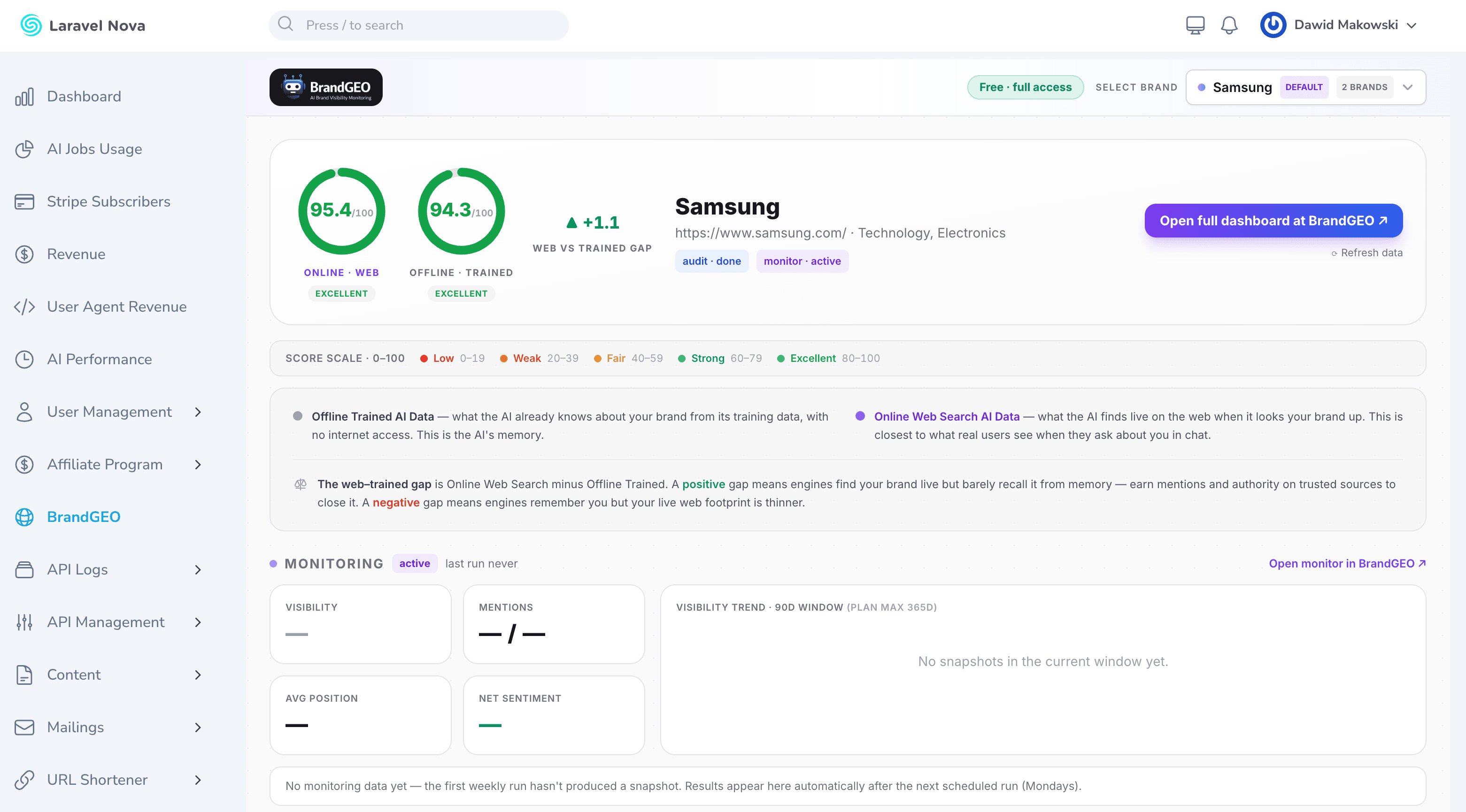
What's on the dashboard
The package mirrors the views you know from the BrandGEO app, brand by brand, with a switcher in the header:
- Monitoring: a KPI row for the current week, a visibility trend chart, share of voice against your tracked competitors, a competitor comparison table, top cited sources, prompt-category insights, your custom tracked queries, and recent AI answers you can expand to read in full.
- Audits: the latest audit with per-engine drill-down. Engines are grouped by mode (live web search first, then trained memory) and each expands into key findings, the analysis, all six visibility dimensions with their confidence levels, and the web sources the engine cited.
- Overall scores: dual score rings, one per audit mode, matching how the main app presents the trained-versus-web-search picture.
Everything respects your plan. On a trial account, locked engines and preview action plans render as exactly that, the same way the app shows them.
Install in five minutes
The package requires PHP 8.2+, Laravel 11 or newer, and Nova 5. One dependency note up front: it consumes our official API client (a2zwebltd/brandgeo-laravel-client), which Composer pulls in automatically.
composer require a2zwebltd/brandgeo-laravel-nova
Register the tool in your NovaServiceProvider:
use A2ZWeb\BrandGeoNova\BrandGeoNovaTool;

public function tools(): array
{
    return [
        new BrandGeoNovaTool,
        // ...
    ];
}
That's the whole install. Open Nova and you'll find BrandGEO in the sidebar. If you haven't connected a key yet, the page shows an onboarding form instead of a broken dashboard: paste your API key (generated once at Settings → API in BrandGEO), and the package validates it against the live API before saving it to your .env. If your account has a single brand, it's picked as the default automatically.
Two small caveats from real setups. If you cache config in production, re-run php artisan config:cache after the form writes your key. And if your app customizes Nova::mainMenu(), add the section manually:
use A2ZWeb\BrandGeoNova\BrandGeoNova;

Nova::mainMenu(fn () => [
    // ...your sections...
    BrandGeoNova::menuSection(),
]);
Configuration
Publish the config if you want to adjust anything:
php artisan vendor:publish --tag=brandgeo-nova-config
The useful knobs:
BRANDGEO_DEFAULT_BRANDpicks which brand opens by default (the "Set as default" button in the UI writes this for you).BRANDGEO_NOVA_CACHE_TTLcontrols how long API responses are cached, one hour by default. The Refresh data button bypasses it whenever you want live numbers.BRANDGEO_NOVA_PATHsets the URL of the standalone dashboard (default/brandgeo-dashboard). The Nova page embeds this same dashboard, but it also works on its own, behind the same auth middleware, for teams that want the view without Nova at all.
The API connection itself (key, base URL, timeouts) lives in the client package's config, so both packages share one set of BRANDGEO_* env vars.
Built on the public API, on purpose
The package contains no private endpoints and no special access. Every panel is assembled from the same read-only API v1 calls documented for everyone: account, brands, audits, monitors, competitors, runs, and trend, cached for an hour to stay well inside rate limits.
That's a deliberate proof point. If a full monitoring dashboard can be built from the public API, so can whatever you're planning: a client portal, a TV dashboard, a weekly PDF job. The API post walks through the whole surface, and this package's source doubles as a working reference implementation.
For agencies, the combination is the point: your clients log into your admin panel and see their AI visibility next to everything else you report, with your branding on the door.
Try it
If you already run Nova and have a BrandGEO account, you're five minutes from the screenshot above: generate a key at Settings → API, composer require, register the tool. If you don't have an account yet, the free brand check shows you what the data looks like for your brand in about two minutes.
Both packages are MIT-licensed. Issues and PRs are welcome on GitHub.
See how AI describes your brand
BrandGEO runs structured prompts across ChatGPT, Claude, Gemini, Grok, and DeepSeek — and scores your brand across six dimensions. Two minutes, no credit card.